After a long summer hiatus that involved a new role, a house move to the other side of London, and a whole lot of life-ing, it’s time for the penultimate part of my Building Your BI Team in a Fabric World Series!
My aim for this series was to share the content of my session, delivered at events including Fabric February in Oslo, which was the last time I delivered this particular talk. Part 5 of 6 focusses on breaking down exactly what agentic development means for BI teams. As well as life being a bit busier than normal, I took my time before bringing you this particular part of the series , because in a matter of months, my views from February on the maturity of agentic development became out of date.
Before we go any further….
Agentic WHAT?!
I appreciate some of you reading this will be fully on the hype train with me, but if you’ve missed it, let’s be clear what Agentic BI is. I don’t mean the development of agents for end users – conversational BI, natural language analytics, etc. I mean AI-Assisted Development: using an agent to augment (or in cases, entirely automate) the BI development process.
For me, that journey started in July 2025, with a viral LinkedIn post by Rui Romano, Principal Program Manager at Microsoft. A 4 minute video, a GitHub repo, and the role of a Power BI developer changed overnight. The demo showed how with the right grounding, LLMs could now design a Power BI data model from a schema and some user stories, execute the build of that model in pbip format, and then optimise itself against Best Practice Analyser rules. The demo utilised GitHub Copilot as an interface. I began immediately researching with my team just how to recreate this process, and stress test it against more complex use cases. I remember one of my colleagues explaining MCPs to me for the first time (thanks Silvia!), and my reaction was very much ‘ok sure that’s cool and all, but it’s a bit niche for BI teams… our clients aren’t going to engage with this’. If you aren’t savvy like Silvia, think of MCP as the usb plug of AI. It acts as a bridge between your tool, and LLMs. While MCPs were taking off in the AI tooling world, at the time, MCPs in our space were typically community built open-source projects you downloaded from GitHub and ran locally and configured yourself.
When I then sat down in a packed theatre at FabCon Europe September 2025 for the last session of the whole week, Rui revealed that Microsoft would be bringing to preview 2 MCPs: The Modelling MCP, and The Remote MCP.
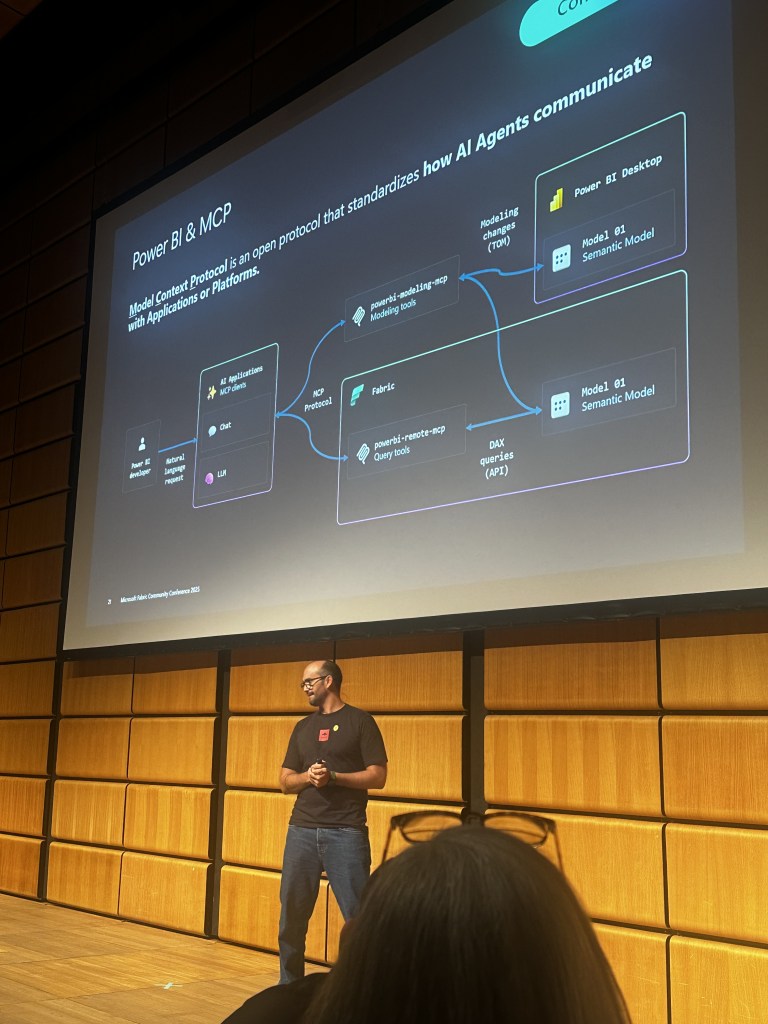
To use the Modelling MCP, which went into Public Preview at the end of 2025, you simply installed the extension to your VS Code interface, along with the GitHub Copilot chat extension, and the effectiveness of the same process drastically improved. Stress tests of complex schemas, such as insurance models consisting of policies and risks and claims, were now seeing successful designs executed.
And so as I did the rounds on the speaking circuit, I presented my view of the end-to-end Power BI process, and where agentic tooling was extremely capable, somewhat capable, or not capable yet. Here’s what that looked like at the time:
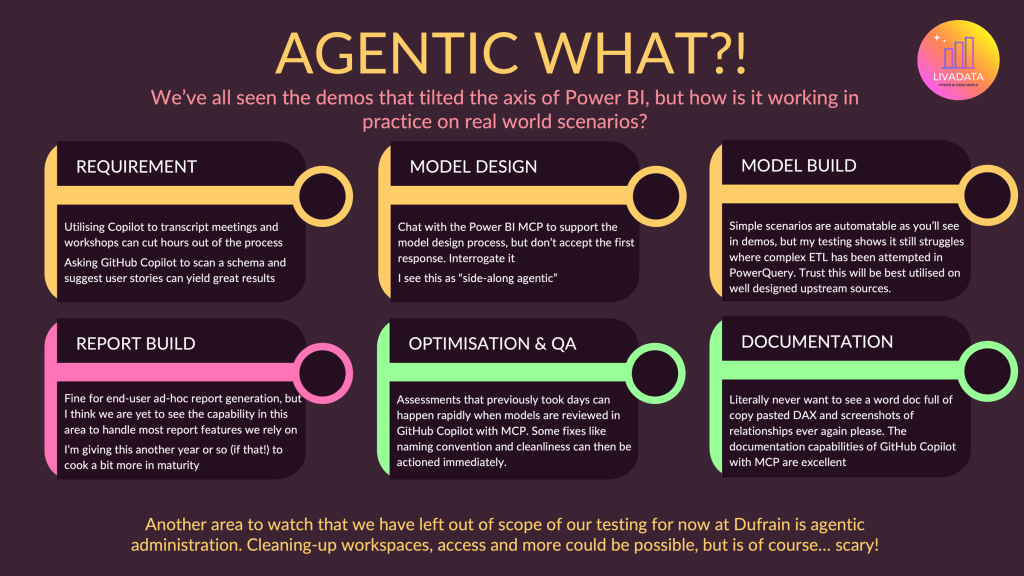
My headline takeaway was:
- You should absolutely be familiarising with this technology, and utilise it when optimising, reviewing or documenting work. “I literally never want to see a word doc full of copy pasted DAX and screenshots of entity diagrams ever again please’. Was the headline. We all know documenting Power BI is a hellish but necessary job, and one of the most thankless as the thing is out of date almost as soon as you’ve handed over the work. Well the GitHub Copilot + PBI MCP setup was able to rapidly review models, apply standards like naming conventions and clean-up, and create effective documentation.
- You should be experimenting with using AI as a side along developer for the requirements, model design and model development stages. I found that asking GitHub Copilot to review a schema provided, and propose user stories could yield pretty useful results, alongside the accelerated process of generating user stories from Copilot transcripts of meetings. I found with the model design stage of the process, that the star schema I usually start to see in my head when talking to a client about their data, was now being documented in realtime as I chatted to an agent about it. My advice was to not accept the first result, but to interrogate and ask why. I found models at the time were prone to creating too many fact tables, often splitting by source table rather than merging tables appropriately. This is where the more ‘finished’ your gold layer is, the faster the process will be on the BI side of course. But as we know, the gold layer is often shaped by BI teams themselves, and so the need to nudge the agent towards your desired schema persisted. The actual ‘ok now build that’ element was a little more hit or miss. Sometimes you got great results, other times you spent more tokens debugging your errors than you did generating Power BI models.
- Report Development isn’t there yet. Power BI Copilot can generate you some very simple visuals for adhoc queries, but the tooling isn’t there yet to produce robust front end visualisations of any substance.
Now… that last part? YET was the key word. Around a month after I delivered this session in Oslo, Kurt Buhler & Maxim Anatsko revealed their community project – pbir-cli. This free command line tool came packed with report skills to accelerate the report design part of the process. Kurt noted at the time that it worked better on custom visuals, and that core visuals were a little more brittle. As a consultant, often operating in financial services sectors and others subject to high governance needs, I am hesitant to deploy anything where I’m creating third party dependencies for clients outside of the Microsoft stack. I am also wary of custom visuals – they have their place, but my aim is always to minimise maintenance overhead and keep Power BI accessible for development teams. But this development was still really exciting for me, because it meant the leading developers in the space were starting to crack it.
Fast forward to Microsoft Build in June 2026, when I was only 3 days into my new role, and Microsoft brought us AI powered Power BI Report Skills. This announcement came at the same time as Fabric Apps, an exciting new way to create data-driven apps on Fabric in a unified development interface. As I settled into a new company, quickly getting to grips with a new team, a new portfolio of clients, and a very busy pipeline, all I could do was catch demos emerging from industry leaders on LinkedIn. The first thought I had was how much is this going to cost?!
The era of low-cost vibe coding has had its day. Accessing the latest models and agentic capabilities now comes at a premium. For example, GitHub Copilot Business moved from a per-seat allowance of requests to usage-based billing, with token credits pooled across the organisation.
Valerie Junk kindly shared her spend along with her demo of a Fabric App dashboard. Her ice-cream sales model has two tables, and yet the build of this cost her $52 in tokens. Some of the app demos I’ve seen Injae Park posting is proper mind melting stuff, and so it’s wild how quick you can feel out of the loop when you aren’t hands on building yourself. Luckily, it wasn’t long before my excellent new team have been getting stuck into seeing what’s possible. Fabric Apps aren’t available on UK South at time of writing, and so we’re not seeing as much from the UK community yet without spinning up extra SKUs.
One thing to note on that front, is that there is a paywall element to much of this that we aren’t used to in the BI space. Power BI Desktop is free to install, and you can build to your hearts content without a license. Trials are available of Power BI Pro, and Fabric Capacities. Those entering the space or catching up have always been able to dedicate time to upskilling regardless of resources available. I worry that some developers may be limited in their ability to upskill and access AI technology if working with tight budgets. Strong business cases are going to be a must here, but I would love to see a lower barrier to entry and ways to make agentic learning accessible.
I recently attended Power BI Next Step in Odense, Denmark. (Which by the way – wow, what an event! We were so looked after by the team out there and the brilliant community out there.) I was delighted to see a packed out session by Ashley Warren on Agentic Development, which followed a great keynote from Stephen Godderidge that took us under the hood of the Power BI Modelling MCP, the report skills and how context windows work. And finally I felt my blogging spark come back, as I was itching to get to compiling what the evolution of agentic development in the Power BI space has looked like in just over a year.
So… where do you start? I’ve compiled below what I see as the Agentic BI Learning Path:
| Step | Link |
| Start with a good nosy at the Rui Romano repo for good context, and a solid demo of the process. | https://github.com/RuiRomano/pbip-demo-agentic-mcp |
| Catch yourself up on PBIP if that concept is new to you. | https://learn.microsoft.com/en-us/power-bi/developer/projects/projects-overview |
| And a quick read on TMDL if you need it. | https://learn.microsoft.com/en-us/analysis-services/tmdl/tmdl-overview?view=sql-analysis-services-2025 |
| If you are totally new to GitHub (like I was) and want to lay the foundations (honestly I just poked around and phoned Giorgia a lot), you have Part 1 and Part 2 of GitHub foundations here. | https://learn.microsoft.com/en-us/training/paths/github-foundations/ https://learn.microsoft.com/en-us/training/paths/github-foundations-2/ |
| You can then work your way through the GitHub Copilot study guide here. If you made it through all that, have a go at the GH300 certification. | https://learn.microsoft.com/en-us/credentials/certifications/resources/study-guides/gh-300 |
| Now it’s time to read up on the MCPs. | https://learn.microsoft.com/en-us/power-bi/developer/mcp/mcp-servers-overview https://github.com/microsoft/powerbi-modeling-mcp |
| Once you’ve got that down, there’s a Microsoft Learning Hub on Agentic Development here, which will also talk you through the report skills. | https://learn.microsoft.com/en-us/power-bi/developer/agentic/power-bi-agentic-overview |
| And for a community take, Kurt Buhler’s agentic development marketplace repo available here. | https://github.com/data-goblin/power-bi-agentic-development |
| Some extra curricular, if you want to ensure your semantic models are prepared for AI. | https://learn.microsoft.com/en-us/training/modules/fabric-prepare-semantic-layer/ |
| Learn more about Fabric Apps here. | https://learn.microsoft.com/en-gb/fabric/apps/overview |
So to conclude, where in February I brought you an opinion on what was working and what wasn’t, my updated answer to ‘what’s working’ is well… a lot! What’s not working? In short – cost, accessibility and governance.
Agentic BI is feeling less niche as time goes on – I’ve already seen recruiters specifically asking for this capability in candidate searches. I believe a year from now, developers still delivering Power BI builds completely by hand are going to feel outpaced by the market, especially those of us in the consulting or contracting market. The need for specialist skills to actually hone these repos, context and point AI capability is going nowhere – so it’s time for BI professionals to get caught up, and for organisations to make sure they are enabling that journey if they want to see competitive results.




Leave a Reply