It’s time for Part 4 of my Building your BI Team in a Fabric World Series! So far we’ve covered
- Why Power BI Governance is a thing
- How my Self-Service Pyramid is where you decide what type of BI team you want to be
- The hats you have to make sure someone is wearing when designing your PBI Operating model
So if you’ve figured all that out, the next question typically becomes well what do we focus on? The pressure to stay up to date with a field that has never moved faster is real. Innovation is super charging what’s possible with the tool we’ve known and loved for over ten years. For a typical BI professional, this is pulling us to understand security, architecture, engineering and AI concepts at an alarming rate which for many can feel pretty inaccessible.
This part of the blog is going to focus you on 5 key areas I would recommend investing your learning into. (There is a 6th, but it’s so major it gets its own blog. That’ll come next!)
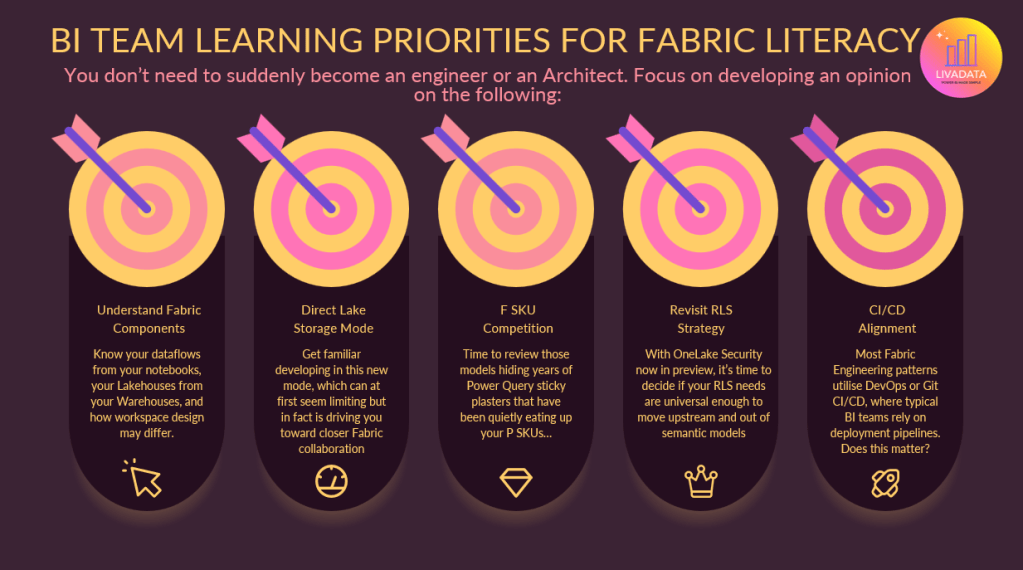
1. Understand Fabric Components
Let’s start with the obvious. I’ve been saying for some time now that the line between Power BI and Fabric is a blurred one. While not every Power BI developer needs to become a Fabric expert, the least you can do is be able to talk the language. Understanding the building blocks of Fabric and the role they play in the ecosystem is critical to being able to collaborate with Fabric engineering teams.
Start with the most basic understanding of Fabric:
https://learn.microsoft.com/en-us/training/modules/introduction-end-analytics-use-microsoft-fabric/
This is part of a longer learning path, which is also worth a browse. Some of these modules are chunky and more technical, so you absolutely don’t have to find 10 hours to get through all this. But having it handy to refer to is a good start.
https://learn.microsoft.com/en-us/training/paths/get-started-fabric/
Set some simple learning goals like:
- Know your Lakehouses from your Warehouses
- Know when you would use a Copy job, Notebook, Dataflow or Pipeline
- Understand fundamentals of Medallion Architecture
- Know how Real-Time components differ and when you would use them
- Understand the end-to-end data flow in Fabric, and the OneLake of it all
If you can grasp those topics, when you’re acting as the BI voice in a room full of architects and engineers, you’ll be able to follow along and advocate for what BI teams need. Do you need to be Spark literate to do that? Of course not! And I find that’s where a lot of BI focussed Fabric learning goes wrong – if you just start chipping away at that big learning path I shared, you start to get in the weeds about stuff you aren’t gonna need to know, and stress yourself about it in the meantime. If you just get comfortable enough to be part of the conversation, that is great.
2. Get to know Direct Lake
Time to strap yourself in. On the surface, Direct Lake is pretty straightforward. A new storage mode which aims to bring your users Import-style performance, with DirectQuery-style freshness. By using Delta tables, it allows your Power BI models to query a Lakehouse or Warehouse without importing data or sending queries back to a SQL endpoint. It’s super easy to setup, as you can connect from a Lakehouse/Warehouse directly. Once you’re familiar with some of the build limitations (less transformation and modelling stuff – just stick to relationships and measures), you’ll find yourself going huh… no refreshes to manage, and the data is just there?! Great!
Then you start to scale up a little, and may find yourself scratching your head at performance. When you start digesting documentation like this, you’ll note there’s a little bit more to get comfy with.
- DirectLake on OneLake v DirectLake on SQL: two forms of DirectLake storage mode, where you consider security methods and modelling/feature capability. DirectLake on SQL can fallback to DirectQuery if DirectLake not available, and so you need to monitor this.
- Parquet files, row groups, and Delta log control how your data is organised into groups and how it performs. Note that your F SKU dictates the number of Parquet files, row groups and rows per table as well as the max model size and max memory.
- Note the feature limitations listed in this article. There are some data types that are unsupported (such as binary or GUID). You should consider the workspace of the model and the Lakehouse – they must be the same region. You also can’t use the same table multiple times in a power bi model – this is the kind of thing we do for some date scenarios, where visualisation requirements or user behaviour dictate that more appropriate than using USERELATIONSHIP DAX. If you need to do this, you have to lean on XMLA tools (or ask your engineer nicely to duplicate the table…)
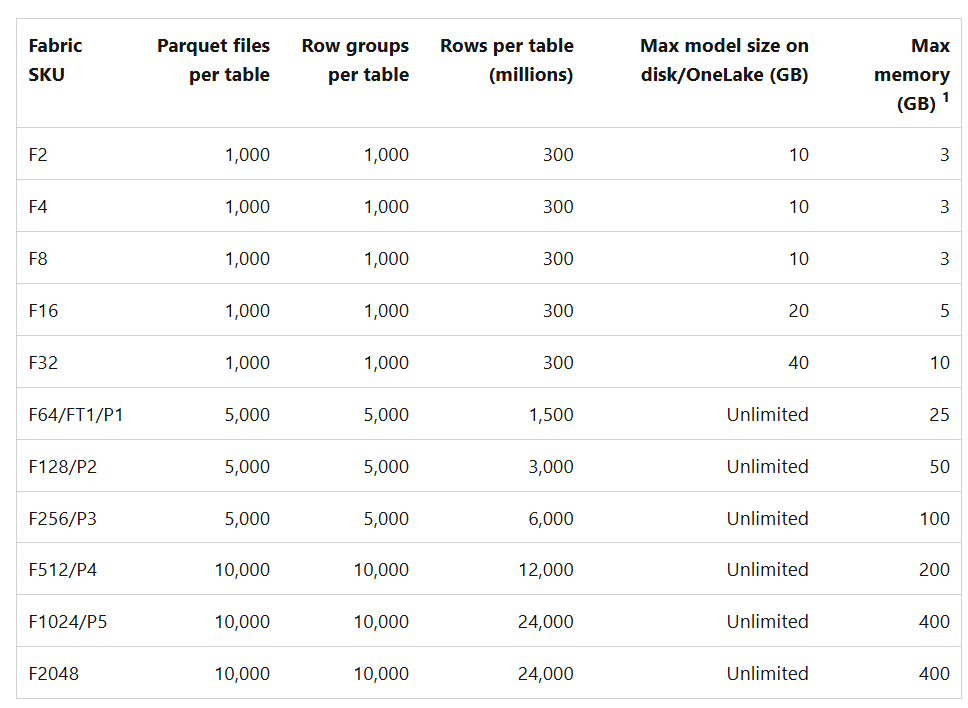
In all honesty, optimising Direct Lake performance has felt like a bit of a dark art as we learn how to deliver at scale. Performance testing is key, as well as good old trial and error.
3. Review F SKU competition
Some BI teams are finding themselves under more scrutiny than before, as capacity consumption comes under greater scrutiny. Teams may have managed fine on a single P1 for sometime, and now find themselves sharing an F64 with a larger group, alongside those running engineering and AI workloads. While best practice is to split capacities by workload, we don’t always see organisations following this – often due to scale. Organisations accept they’ll get to it eventually, but for those first phases of a migration they simply muddle along.
What this means for BI teams, is your skeletons are no longer in the closet. They’re in the capacity metrics app! Migrating to Fabric is the perfect opportunity for BI teams to dust off years of tech debt and optimise your models. Often the product of not having access to a data platform, or poor collaboration with engineering teams, Power BI teams have survived for a long time by just whacking PowerQuery sticky plasters where they need to. Models sometimes just drift – tables added here and there, and before you know it your star schema is a snowflake (or a spaghetti…)
If you want your Power BI models to perform up to scratch in the Fabric ecosystem, and take advantage of AI functionality like Power BI Copilot and more, we need to get our models up to standard.
My point here is that you can upskill in Fabric and AI all day long, but you shouldn’t neglect your bread and butter skill set. Invest in your modelling capability, and learn how you can modernise and streamline the work you’ve already done which may have gone a little neglected. In the next blog, I’ll talk a little about how you can use MCP technology and more to support with this step.
4. Review your RLS Strategy
Dynamic RLS in Power BI, driven by the USERPRINCIPALNAME DAX can be computationally pretty expensive. It’s an accepted anti pattern in the community where you whack a bidirectional relationship into your model with all your organisations hierarchies. For large organisations these can turn into pretty huge tables.
With OneLake Security now in preview, we have the ability to secure our RLS upstream in a Lakehouse instead of Power BI models. It’s done via roles and SQL instead of DAX, and will not be dynamic but will remove the burden from your PBI models. This enables a more universal approach. It’ll require a little pivot in approach, but is absolutely a layer of Fabric worth upskilling in and understanding for BI teams. It won’t always be the solution, but I’m interested to see this explored.
https://learn.microsoft.com/en-us/fabric/onelake/security/row-level-security
5. CI/CD Alignment
Ah one of Reddit’s favourite topics. CI/CD for many Power BI teams genuinely often still looks like “save file in OneDrive, publish and check all ok”. If you’re lucky, teams have set up a teams folder for pbix files and have a deployment pipeline they’re getting by with to get to prod. The reason is partly that with Power BI aiming to be an accessible tool, many who build models and reports don’t have the technical background that makes DevOps and GitHub feel accessible. It’s also just the case that not all teams need complex versioning and deployment processes. Unless you’re operating with multiple developers working at the same time on the same models, it’s usually enough to have basic disaster recovery and change management routes.
Now… along comes Fabric. BI Teams now find themselves working alongside engineering teams who are implementing ‘proper’ CI/CD methodologies and feeling the pressure to align. Many organisations don’t want to endorse multiple processes for teams operating side by side. If you accept that BI teams need less complex CI/CD, and you endorse a simpler route, you have to then make sure your models always live separately to fabric workloads, and your teams have that separation. What about when BI teams start to dabble in fabric workloads? Essentially the argument against aligning weakens pretty fast. For scalability, many organisations I work with are now opting to roll out CI/CD patterns and branching strategies that will meet the needs of their engineering AND BI teams.
The concept of branching strategies has melted my brain a little for sure, so all I can say is thank the gods for Giorgia Tibaldero who dedicated hours of her life researching this and explaining it to me like I’m 5! If you don’t have a Giorgia to hand, then this is 5 of 5 on my list of homework topics for BI professionals looking to upskill and ready themselves for the Fabric world.
Some starter documentation here:
https://learn.microsoft.com/en-us/fabric/cicd/cicd-overview
https://learn.microsoft.com/en-us/fabric/cicd/manage-deployment
What about the 6th one you mentioned?
Agentic BI. MCPs. Conversational BI.
It’s terrifying, but it’s not hype. It’s exciting stuff, and deserves attention of its own. So thanks for taking the time to read through the latest in this series, and I’ll be back soon with the penultimate blog in the series… Agentic WHAT?!
See you then!




Leave a Reply