Kicking off Part 2 of my Building your BI Team in a Fabric World series, it’s time to delve into the core design theory at the heart of Power BI. Before you can plan any Governance strategy, it’s important to first design what sort of data function you actually want to be. I’ve worked with teams where workspace design, access plans, development standards and RACI definition all becomes stalled by a lack of consensus on the analytics strategy overall. Often, the lack of this doesn’t really come to light until you go to talk about the detail. Talk about the theory too long, and many organisations won’t be able to relate. It’s not until you begin to plan the practical details that the gaps actually surface.
One method I have to support closing this gap, is my Self-Service Pyramid for Power BI. By marrying up the theoretical design concepts with what that actually translates to in Power BI assets, I can help teams visualise their appetite.
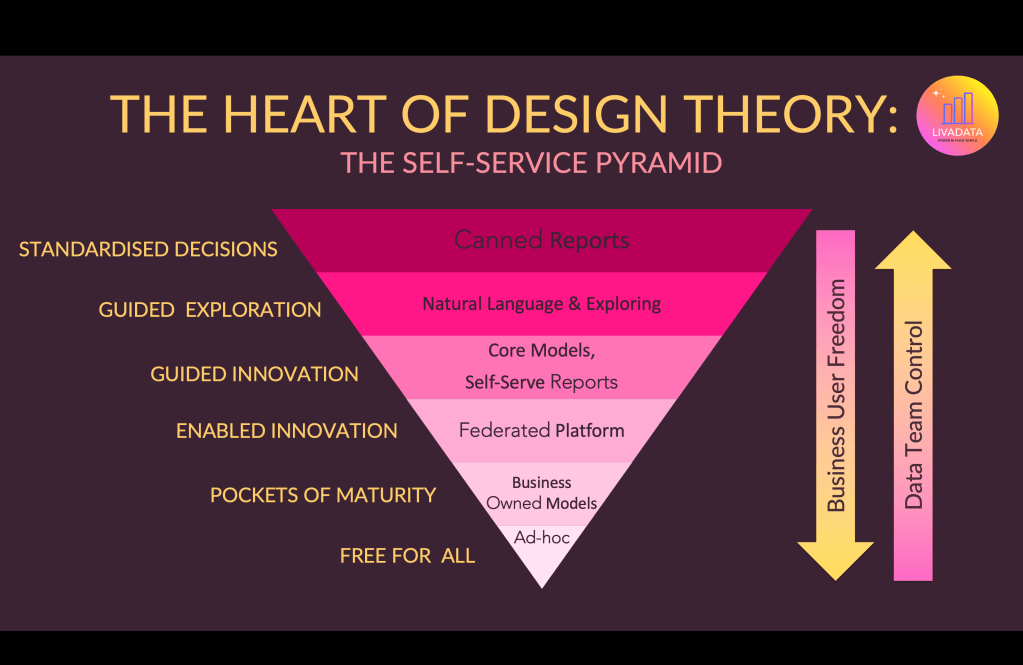
The core principles are that the further down the pyramid you go, you grant business users / end users more freedom, while relinquishing data team control. This is the balance of controls and innovation you must decide where to strike before designing processes that accommodate.
The first critical element to understand: the pyramid is not a maturity ladder. While many ungoverned Power BI tenants will mostly find themselves at the bottom of the pyramid, the aim is not to see the top of the pyramid as the ultimate goal. The most mature Power BI teams I work with are enabling multiple layers of this pyramid in parallel, assessing the best fit for each area of the business.
AD-HOC
Starting with the area I affectionately refer to as the “free-for-all”. This is the Wild West hellscape I talked about in the last blog, that we have all seen too many times.
Technically, this often looks like:
- Individual Power BI Desktop models
- Reports built on exported data
- Personal or loosely governed workspaces
- Minimal semantic model reuse
So is the answer to kill it off? As soon as feasibly possible? Not necessarily. Organisations truly using Power BI as a day to day tool and not just “that thing IT do” will operate this way for throwaway work. An adhoc marketing analytics sample that isn’t regular and needs some quick and dirty transformation and visualisation should not sit in a central teams backlog, nor does it necessarily demand to adhere to development standards, version control or require supported gateways etc. I know… shock – I just said Power BI can exist without governance! But it’s true. And in my view it’s the forcing of control in scenarios like this that switch people off altogether.
Culturally, this stage is characterised by curiosity and experimentation. People are trying things, solving immediate problems, and proving the value of analytics to themselves and their teams. It’s chaotic, but it’s also where enthusiasm for data is born. Data teams should create spaces for this behaviour to exist, and see it as a way to observe emerging patterns.
Solution: Sandbox workspaces that central teams have access to, Tenant Wide Activity Monitoring that flags anything critical, Proactive BI Business Partnering to understand what’s working and plan for how central teams can adapt to support.
POCKETS OF MATURITY
Over time, certain teams begin to develop more structured approaches to analytics. These are what I call “Pockets of Maturity.”
Culturally, this happens when a business function realises that multiple people are solving the same problem repeatedly. Instead of every analyst rebuilding the same logic, someone takes ownership of creating a shared dataset.
This is where business-owned semantic models often emerge.
Technically, this typically includes:
- Shared Power BI semantic models
- Small groups of analysts reusing the same data model
- Workspace-level collaboration within a team
The important nuance here is that these assets are still largely owned by the business, not the central data team. They solve real operational problems but may lack enterprise governance.
Rather than replacing these assets, the data team should identify the ones that have strategic value and consider how they could evolve into more formalised data products. Now whether these business owned models are classed as “Federated” models or not depends on whether the central data function is supporting this behaviour with guard rails.
Solution: Encourage pockets of maturity with business owned models to become federated areas. Ensure models live in federated workspaces that follow the minimum level of governance agreed (workspace naming, clear understanding of admin responsibilities and security).
GUIDED V ENABLED INNOVATION
I’m grouping these next two tiers into one section here because I feel they are the heart of where self-service strategies get lost. When teams begin to mature from cultures with very little control, words like “federated” and “self-service” begin to be thrown around almost interchangeably. Inversely, teams bottlenecked by limiting MI capabilities to central teams come to understand they must widen innovation capabilities, but get lost on how to do that.
The key to separating these core tiers of the pyramid is understanding the agenda of the end users. Are they happy having access to the right models in a timely fashion, or will there always be a desire to own how they get from a to b? Understanding if your end users want to be report builders (what I call Explorers) or model builders (what I call Power Users) is key to determining how to support them.
A Federated Platform would look like
- Workspaces that follow Naming Convention
- Central teams have Workspace Admin for visibility but not ownership. Federated teams also have a delegated Workspace Admin who is responsible to maintain the health of the workspace.
- A central gateway is ran and maintained by the central data team or IT support functions, but the federated teams may be connection creators.
- Standards for development, deployment and versioning and access management are recommended but not mandated.
What’s important here is to understand whether this behaviour is a product of necessity due to central team’s lack of capacity to support, or a genuine desire to fully own reporting within their business.
Where it’s determined that teams simply want to produce front end reports and would happily be served by models which work, I see this less as a Federated data model and more a demand for report sandboxing.
Guided Innovation would instead look like this
- Models available in central workspaces, with access granted via direct build access on the items. Make this manageable through Entra groups. (This is where we often get caught up in workspace roles but it’s really not required if your Entra management is sorted.)
- Teams have Business Sandbox workspaces created where they are encouraged to produce their own reporting utilising central models.
- Development guides are available which advise how to stick to live connection models (and prevent accidentally creating local models without intention), when composite models are appropriate, and agree whether any local models in these spaces are ok.
- Effective monitoring in place so central model owners know the impact of their changes.
GUIDED EXPLORATION
This is the stage of “self-service” that in the past to me simply meant a bit of poking around the data. Encouraging organisations to teach users how to analyse in excel to avoid exporting. Excel doesn’t need to be a dirty word. For many teams, fighting its existence is only further distancing your users from you (Finance teams I’m looking at you). Showing users how to create live connections to models and create pivot tables from Power BI measures and more, which will update as the model refreshes allows greater governance and reduced overhead for all. (Side note to this – I only recently realised how great the Databricks to Excel plugin is. It looks really slick compared to the somewhat dated Power BI connection interface. One also has to consider if creating a Power BI model that runs solely from Databricks, for users which are going straight to Excel, do we need a Power BI model at all? Right tool for the right job is key here)
There is of course also the “Explore” functionality within the Power BI Service itself (are we still calling it that? Is it too soon to just say Fabric and trust people know what I mean?). Encouraging users to get familiar with this functionality could cut down on tonnes of abandoned throwaway reports that are simply someone checking a number.
With that in mind, the real heart of this tier of the pyramid moving forward will become conversational analytics. Creating Power BI Copilot friendly models and delivering Fabric Data Agents will unlock a large element of self-service demand. I’ve been seeing great results from rollouts of Power BI Copilot. With the right model prep, AI Instruction tuning, verified answer setting and prompt testing, the outputs for end users are getting really exciting. The only thing I lament at this stage that’s missing is the ability for model owners to see what their users are asking and the results they’re getting in order to fine tune the experience. There are some bits in Purview which help a little, but nothing super accessible to a typical Power BI Developer. Hopefully this is something we see emerge soon.
STANDARDISED DECISIONS
At the top of the pyramid, where the data team retain optimal control and the business are dependent on insight provided to them by central teams. Its place is the Self-Service Pyramid is to acknowledge that we don’t always need self service at all. There are scenarios that call for well served, accessible, accurate and slick reporting. Exec reports. Regulatory reports. The governance decisions here centre around setting these reports apart in the estate from those created by business led innovation. Using certification and endorsement labels to flag them as gold standard insight.
But what exactly does that mean? To me, it’s confidence in
- Agreed definitions of metrics across an organisation
- Accurate reconciled data
- Not hung together with technical debt. Your gold standard reports should be running on a STAR SCHEMA model (I’m shouting that because I can’t stress it enough), without reams of power query everyone’s scared to touch.
- Optimised performance. These reports should be acknowledged as something the central team monitor and regularly optimise.

So there you have it. Thanks for coming on another journey through my Power BI brain with me. If you take one thing away from my Self-Service Pyramid, it’s that governance isn’t about eliminating the lower layers. It’s about designing for them.
Many Power BI estates end up living permanently in the “Free for All” stage not because organisations want chaos, but because no alternative has been intentionally created. A healthy analytics function recognises that different types of work require different levels of control. Throwaway analysis, business insight, enterprise reporting and conversational analytics all have their place. The role of a Power BI governance model is to make sure each of these activities has a clear and appropriate home in the platform.
When teams understand where their work sits in the pyramid, governance conversations become much easier. Instead of debating abstract theory, you can discuss practical questions:
Which layers of the pyramid do we want to enable today? Which parts of the business belong in each layer? What controls are appropriate for each level of ownership and risk?
Once those decisions are made, governance stops feeling like restriction and starts to look more like enablement.
In the next part of this series, I’ll move from design theory into the human elements. Which hats a team has to wear to effectively support a Power BI platform. Because once you know the shape of the pyramid you want, the real challenge begins: working out who deliberate it.





Leave a Reply