Time for Part 3 in the Building your BI Team in a Fabric World Series! So we’re on the same page about the problems Power BI Governance addresses, and we’ve explored the levels of maturity a business might aim for in their analytics teams. Now comes the critical step of working out who makes all that happen.
If we take the “Free for All” chaos we explored and part 1 and roll it back to where the first broken link in the chain is, it’s often that no clear responsibility or ownership was defined. This is becoming all the more prevalent where mature Power BI platforms are fast turning into Fabric platforms. I’ve seen patterns of organisations taking the keys off BI teams and handing them over to IT teams, in a bid to “control and secure” Fabric. Or in others, it’s like the hot potato nobody wants to touch given it’s much wider remit.
Up there with the top 5 questions organisations ask me when embarking on a Power BI Governance & Adoption plan, is how they can support a federated operating model. Sometimes, this comes from a place of the central team not having the capacity to truly support business demand. Seems like an easy fix right? Run some Power BI training sessions, setup a Teams Channel CoE, and now the business can build their own models. Problem solved right? The critical step missing here, is to define the remit of a central developer versus a community developer.
As with most of my blogs, I will always remind you there is no one right way to do things. There is no magic pattern for roles and remits that will fit all organisations. What I can advise, is the framework I start with to give you an idea. The key principle of role design in Fabric and Power BI, is to be clear these are not distinct job roles that unique people need to hold. They are simply hats to define, and then you make sure someone is wearing them. Yes tiny BI teams may wear many hats. Sole BI developers for their organisation may wear ALL the hats. This is perfectly fine as long as you know what hat you’re wearing, and when.
Step 1: Understand Admin / Central / Community Roles
Before I go into individual roles during design stage, I talk to a business about platform ownership, central teams and community teams. Discussing the self-service pyramid is key here. How much appetite does the business have for community development? Agree the balance between controls and innovation. Assess here also who currently owns the platform. Who has Fabric admin access? Who updates tenant settings? Who agrees the capacity sizes (and hopefully monitors them)?
Step 2: Understand the Admin hats
- Fabric Admin: The ultimate admin role, this is the role that designates overall accountability for the health and success of the Fabric platform.
- In large organisations, this may be split into a Fabric Strategic Admin, and a Fabric Platform Admin. Strategic would be those making design decisions about how the platform operates, and Platform would typically be an IT team who then enact that.
- To help Fabric organisations straddle the politics of who gets to call the shots on platform design when what did belong to the BI team now belongs to many, I often recommend design forums. Heads of Architecture, Engineering and BI can form panels which collectively call the shots on tenant settings, RACIs and workspace design.
- Capacity Admin: Accountable for monitoring performance, utilisation and cost of capacities. Whilst for most organisations, this will be the same individual(s) as the Fabric Admin, for larger organisations where the wider business are able to fund and manage their own capacities, it’s key to document the expectations of this role and ensure federated teams cover it. All Capacity Admins should have access to the Metrics App for their SKU, and understand the need for them to regularly review this. They would also be responsible for proactively kicking off conversations with users eating disproportionate amounts of CU.
- Workspace Admin: Those with the remit to monitor content within a workspace, and manage the health of it. This critical role really is the engine room of governance within your organisation. It’s often too much to ask a Fabric Admin or even a Capacity Admin to monitor all models, notebooks, pipelines and reports in their platform or capacity respectively. By delegating this accountability to the next tier, you increase the number of people collectively trying to make it all work.
- It is critical for encouraging Federated Data Models to define the expectation for Workspace Admins. I sometimes see pushback that central teams should remain the Admins of Federated workspaces. There is no argument for giving them visibility, but I would encourage allocating the federated teams this remit to essentially create a contract where “with great power comes great responsibility”. Yes you can build and manage your own stuff, but now you have to actually manage it.
- Workspace Admins would be expected to: monitor how access is being granted monitor versioning and deployment; monitor and archive inactive assets; proactively manage performance; and ensure any workspace apps are maintained.
Step 3: Understand the Central BI hats
When it’s time to define the different hats a core BI team might wear, this is where scale really comes into play. Small teams will rarely assign these roles or even assess these skill sets – it’s just stuff the BI team naturally do. For larger teams, taking time to assess how capabilities align to these roles can be a great way to understand which strengths you want to bolster. I find it also a great way to help those progressing in their career understand where to focus their efforts.
- BI Engineering: you’ll also see this role referred to in the market as Analytics Engineering. The remit for this role would be to focus on delivering reporting layers and semantic models. In some larger teams, these engineers would rarely touch a visualisation, instead focussing on Power BI models and the reporting layers of upstream platforms. In other teams, BI Engineers will absolutely take on front-end work, it would just be understood that their strengths lie in the modelling and engineering. We can’t be great at everything, so I don’t mark down performance of a BI Engineer who doesn’t have market leading design skills. As long as they can cover the basics, this is acceptable. The real reason for defining this role is that organisations can get a little funny about letting BI & Analytics teams loose on a data platform. It’s often seen as something for the engineers, and those pesky Power BI Developers can’t possibly be writing notebooks and creating views. Where this separation is enforced, it often leads to large amounts of tech debt in Power BI, as BI teams don’t have time to wait on an engineering team writing a bit of SQL or adding a column they can do themselves in the tool. This is where the sticky plasters mount up, and the platform becomes half of what it needs to be for the business, with all the good logic stuck downstream in a pbix somewhere. The most mature organisations I work with recognise this need, and create space for analytics engineering in their platforms. By defining the people in a BI team who lean that way in terms of skills, it grants further peace of mind for data platform teams, and allows BI teams to organise themselves in a way that uses everyone to their strengths.
- BI Developer: This would then be the traditional BI role that we would assume. There would still be an expectation to be strong semantic modellers, but these people would typically operate in an environment where a reporting layer is ready for them. Tactical development will always exist, and so this persona is unlikely to get away from the odd spreadsheet Power Query here and there, but typically they will not have robust engineering skills and their talents lie in the visualisation side instead. You’ll sometimes see this role in organisations as BI Analyst, or Visualisation Analyst etc. My advice to this persona, is that what you lack in engineering skills, you should solidify in strategy and admin. I fell into this persona for most of my career at various levels of seniority. I wasn’t going to upskill in engineering, so I had to upskill into how to design and run a platform. Understanding governance fundamentals, being able to contribute to a CoE are all expectations of Senior BI Developers.
- BI Business Partner: this persona is often missed, and is just organically done by someone senior somewhere. Taking time to define what it actually is, and understand who is wearing that hat can be key to getting away from becoming a firefighting backlog team, and get to become a proactive delivery team. Some large organisations will have dedicated business partnering, and these people’s sole role will be to work with stakeholders and end users to proactively understand their needs. These roles are critical to adoption at scale – users need a name they know that they can pick the phone up to say “I have no idea what this report is telling me”. While a Strategic Admin typically will have Accountability for a CoE, Business Partners become the beating heart of it, supporting engagement sessions and feeding back what the user base needs. Working on end user adoption materials based on what they’re hearing on the ground. This role doesn’t need to be a super technical role – it’s the human element that matters. As long as BI Business Partners can talk the lingo and are solid adopters of the tool, they act as the bridge between the business and technical teams, guarding developers from end user demand.
Step 4: Understand the Community hats
The third group of users to assess would be everyone outside of your “Core Data” teams. That can be a task in itself, but there’s really no hard and fast rule for this. It’s about the culture of your business. Typically I would define this as people whose primarily role is not data, but they are engaged in Power BI to some extent. It can also be dedicated Power BI people where they have been hired by a business function, and operate outside central team reporting lines. Separating this community of users into 3 can help you plan the level of support you should look to provide.
- Power Users / Federated Users: Individuals who have a desire to own their reporting to an extent. These users typically want to go further than self-service, and prefer to build their own models and define logic. While these users can vary in maturity, the remit your governance model grants them is often down to the appetite your business has for business owned reporting. Refer back to last weeks self service pyramid! For some businesses, it’s easy to enable these users and then find yourself lumped with business critical reporting that is built on a house of cards. There are absolutely minimum standards of governance here – centrally owned gateways, workspaces and access principles adhering to structure, and monitored for relative performance.
- Explorers / Sandbox Users: I would say from experience that too often BI teams lump this role with the previous as “champions” and “self serve users”, when in reality their needs and wants are very different. Where a Power User has a desire to have some ownership and control of their model, usually to enable flexibility, an explorer would typically be happy to be provided with a model that works and truly enables self service. It’s important to understand the separation and target your support of these users appropriately. Often explorers become reluctant power users because they feel forced to meet a business need that for whatever reason, a central data team is not meeting. With less standards expected of them and approvals flying under the radar, they can typically get there a lot faster. The key is for BI teams to understand the business questions and processes these users have to address, and what it takes to deliver that for them solidly.
- Consumers: these are the heart of our operating model, as without them what’s the point? Our end users need to be supported through adoption, as we often take for granted as Power BI fans things that won’t come naturally to a new user. Those drill down / up arrows… there’s 4 of them! People will not always just click them and figure it out. Drill throughs. Interactivity. Tooltips. Slicers v Filter Panes. Personal bookmarks. There should be standard end user handbooks explaining all of this, and BI Business Partners should be covering this as part of any new user onboarding. Getting regular feedback from this group on sentiment is critical to truly understanding performance and effectiveness of your work.
Step 5: Assess how to scale
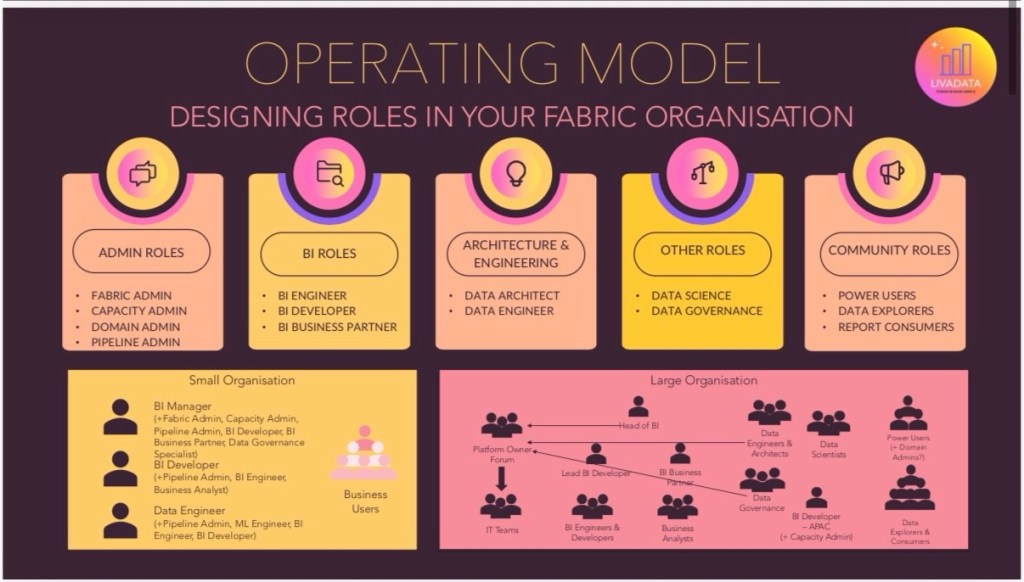
With all of that figured out, now comes the question of how does this all fit together?
There is no magic answer, but understanding how this might take shape in a 3 person BI team versus a large organisation is key. Where in that small team, the most senior person is going to wear the hats of Fabric Admin, Capacity Admin, BI Business Partner, and Developer all in one, your large organisations will avoid a key person dependency like this.
The primary issue I’ve seen for larger organisations going through a transformation from being a Power BI org to a Fabric org, is that someone sees fit to take the admin keys off the BI team and hand them over to an IT team somewhere. I typically strongly advise against this, and steer instead towards a design forum. Setting up a forum for Heads of BI, Engineering, Governance and Delivery where workspace structure, CI/CD processes and tenant settings can be discussed and agreed, before handing briefs over to IT teams to enact is how I would tackle it.
BI teams have lived in this platform for years. We know its quirks, what works and what doesn’t. When you apply traditional architecture methods to Fabric, it can quickly become bloated and far over complicated. Overuse of the workspace roles and neglect of app audiences and direct item access via entra groups is an example of this. On the flip side, of course if we ask Power BI teams to own a Fabric platform, we will often be making decisions on things which cover a far wider remit. This is where collaborative ownership comes in.
Fabric doesn’t just expand what your platform can do. It expands who needs to be involved in running it. That’s where most organisations struggle. Not because they lack capability, but because they haven’t defined ownership. If you take one thing from this:
Don’t start with org charts.
Start with hats.
Define the responsibilities clearly. Then decide who wears them. Get that right, and everything else (governance, scale, adoption) becomes significantly easier.
So that’s a wrap on Part 3 of Building your BI Team in a Fabric World! Hopefully you feel armed to consider the roles and remits of your teams better from this, and how you can support the wider community in your team. In Part 4, I’ll cover the great skills shift. How BI teams need to begin to adapt to meet the rapidly changing demand in Fabric and AI.



 Livadata
Leave a comment