
Off the back of some brilliant sessions at SQLBits, I found myself itching to try out a few new things in Fabric. I spun up a quick end-to-end proof of concept to test the waters with my own medallion architecture and, along the way, finally gave Task Flows the attention they deserve.
I set a new workspace up to get dabbling, and with a manual spreadsheet mimicking some source systems I work with, I got started building out my own medallion architecture:
- Ingested my Excel tables with Dataflow Gen2. Data volumes are small, and any production recreation of my demo would be calling APIs directly and so swapped out for a notebook.
- Created a new Bronze Lakehouse for my dataflows to write to.
- Set up a Notebook to pick up my tables from Bronze, apply some basic cleansing and set date types before writing to a Silver Lakehouse. I also had another Notebook create a date table here.
- Added a Notebook to create my dimensions with a cell for each one, and separate Notebooks to create each Fact Table.
- These notebooks wrote to a Gold Lakehouse. The Microsoft decision guide would recommend a Warehouse for analysing structured data in a scenario where I’m likely to have multi-table transactions. For this quick POC, I opted to just go with a Lakehouse and use the SQL Endpoint to import data to my Power BI model.
Once I had this all up and running and sorted into Workspace Folders, I expanded the task flow pane and opted to ‘Select a predesigned task flow’ – there are plenty of options to choose from, but I was after the Medallion Architecture one – which looks a bit like this:

By clicking the paperclip in the bottom right of the task flow boxes, we can attach items in our workspace to each stage.
I have no high volume data ingestion, but I assign my Bronze layer Dataflow Gen2s to my Low Volume Data Ingestion stage. I assign my Bronze Lakehouse to the Bronze Data – Store Data stage. I then assign my cleansing notebooks to the Initial Process – Prepare Data stage. When I click that, my workspace will now filter to only the items assigned to that stage. This is a small feature with big impact – even the most well-governed workspaces can become large and, without the right documentation, difficult to manage.

With clear tags, we can immediately see as we navigate through a workspace what each asset is contributing. Task Flows allow us to assign metadata to workspace items within the UI. We can write all the wiki pages we want, but nothing is going to feel as intuitive as tags within Fabric itself that let us quickly understand the flow of our process.
One session that sparked this line of thinking was Warwick Rudd from SQL Master Consulting‘s session on “Improve productivity quickly by integrating new Fabric Task Flows for Better Project Management.” I think to many people, Task Flows remains an unexplored functionality that appeared in Power BI workspaces one day, took up loads of the UI that we collapsed and said “anyway let’s be getting on with it.” Warwick demonstrated the pre-defined task flows and how they can be used to enhance design processes in Fabric.
There is one key limitation to this feature for me – you can only have one workspace per Task Flow, and one Task Flow per workspace. The common guidance around medallion architecture is that Bronze, Silver, and Gold layers are set up in separate workspaces. The need to separate raw data from those users who will only want cleansed or transformed data demands the use of workspace separation.
However, the exercise of putting together this proof of concept, assigning items to a Task Flow and being able to quickly navigate my entire end-to-end process in a few clicks made me wonder: Are we overcomplicating things that are in some cases very simple?
In the Power BI world, we’ve long preached that there’s no one right way to organise your platform. There are best practices, but at the end of the day your workspace structure and access management strategy has to fit around the cultural feel of your team.
Take my diagram from the Building your BI Team in a Fabric World session that demonstrates differing role assignments across different scale teams:
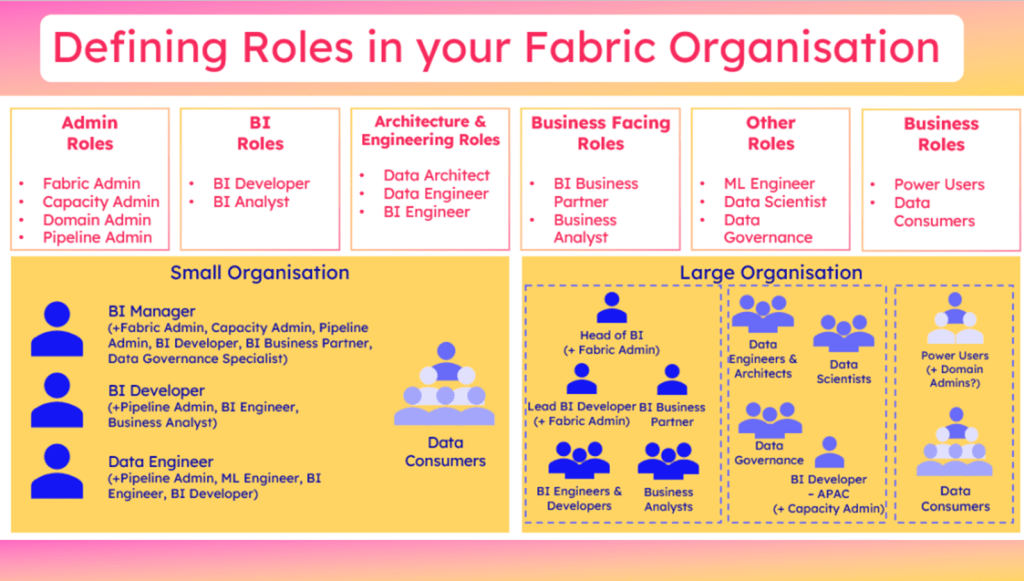
In the small organisation scenario where the entire data team consists of 3 people – a Manager who absorbs Admin and Business Partnering duties, a BI Developer who is our main report builder, and our Data Engineer who owns the ETL. For these smaller scale scenarios in a legacy SQL world, chances are all 3 people were cross-skilled and could have had the same levels of development access. The BI Manager would hold the elevated Admin access of the platform, and perhaps the Data Engineer would be the primary person responsible for ingesting and transforming new data, but all 3 would have read/write access. Perhaps for some orgs, only the Data Engineer held the write access, but the other 2 had full read access.
Translating this to a Fabric access strategy in a scalable way often then prompts the assumption that we must separate Bronze and Silver data from the Gold data where BI teams may step in.
This assumption often centres around the concentration of access management on assigning workspace roles. In a Power BI context, I often see organisations with sprawling workspaces caused by setting the intent that each unique combination of report viewers demands a new workspace and viewer role. If access is managed via Entra groups, the maintenance overhead for BI teams is streamlined and I would argue adding direct asset access is then acceptable, or for reporting scenarios app audiences is the leading suggestion.
In the scenario of the 3-person Data Team, we could argue the BI Manager requires Admin Access, the Data Engineer would need Member Access (perhaps also with Admin to remove Key Person Dependency), and the BI Developer would need either Member or Viewer depending on whether they supported with Gold Layer transformations or not.
So what about data consumers who may need to self-serve from the Lakehouse, you say? Well this is where Direct Access comes in. If using Entra Groups, you could argue the Fabric items stay in one easily manageable workspace, with the small data team having the only workspace roles, and data consumers looking to self-serve are granted read access of the Lakehouse itself. Individual fluctuation of access needs is managed via the 4 Entra Groups themselves, with no need to amend which Entra Group is granted access where.
As teams scale, of course the need to segment raw, cleansed and transformed data will increase, along with the complexity of needs from different teams to view or build data. This is where I would agree the use of separate workspaces will outweigh the benefits of a single Task Flow visualising and easing the navigation of Fabric assets.
I would love to see Task Flows evolve to somewhat align with Workspace Linage view – cross-workspace visibility. Where lineage view lacks the tagging capability, perhaps these two features could combine in future to give us a unified, end-to-end tagging system?
For smaller teams especially, Task Flows offer a surprisingly elegant way to anchor process visibility directly within Fabric. But for broader adoption, they’ll need to evolve with the way we architect: flexibly, across workspaces, and at scale.
Until then, maybe the real question is—how often are we building complex governance structures because we think we should, not because we actually need to?




 Livadata
Leave a reply to Do you know how to config Direct Lake? – Livadata Cancel reply