
So having now toured “Building your BI Team in a Fabric World” around the Manchester User Group, SQLBits in London and finally Fabric February in Oslo, I’ll likely now retire that session to make room for some exciting new topics I’m looking forward to covering. That being said, this session covers the heart of what I do. So to kick off this mini-series and ensure the aims of are eternally online for you to access… let’s talk about why we bother governing Power BI at all!
I would say 2023 is when we began to see “Power BI Governance” emerge as a mainstream topic in the community. Consultants like myself were repeatedly being asked to come in and help organisations wrestle control back of platforms which had become unmanageable beasts. With so much theory out there already about Data Governance, there was a question of why Power BI required an entire governance strategy of its own. There are certain words in the data world that are used almost universally, while meaning different things in different contexts. “Domain” is an example. Don’t get me started on debating Fabric Domains when people are thinking Business Domain, Data Domain, or something mysteriously different altogether…
The challenge is that when you think about it, how often is Power BI actually implemented? When organisations decided to roll out SharePoint, Teams, or as those in the thick of M365 Copilot roll outs would know, the implementation of a new product in an organisation requires careful planning, piloting, testing and monitoring. So why is it that with Power BI it seems to just happen to us by accident? For some organisations operating on Microsoft E5 licensing, it’s that the inclusion of Power BI pro licenses enables a sort of default turn it on attitude. For other organisations, it can be as simple as a single Power BI fan is hired, sweet talks IT into buying them a Pro license, and before you know it the horse has bolted.
Where I often come in, is about one year down the line.
- Without anyone realising, workspaces have sprawled to the thousands (and yes there is always one called “Dev” and nothing else).
- People turn up to meetings crying “number bad!” to an audience of bemused faces convinced “number good?”. This is a product of no definition of the truth. KPI Names are thrown around with zero integrity, and no management of logic and calculations.
- Version Control is non-existent, and critical business assets are managed in pbix copies saved locally. Factor in the lack of workspace management, no controls for deployment, and we end up with duplicate copies of core models and reports.
- At this point, users have usually given up and have resorted to Excel. Without any confidence in which report they should use, where they should access it, and what any of the numbers in it mean, people will take matters into their own hands and rely on a spreadsheet. An extra day a month of processing is a necessary evil when weighed against accuracy and ownership. I’ve seen adoption of critical reports collapse due to info of a single slicer not being kept up to date, where a spreadsheet once again becomes the reliable way to access information.
- The dreaded moment when a refresh fails, or a number is wrong somewhere, and some poor dev opens a pbix to find 40 Power Query steps in one table. “Replaced values” whacking a plaster on a bad data input someone didn’t like 2 years ago. A simple refresh correction or visual fix can become a use case to burn the thing to the ground and start again.
- Inevitably, when all this is going on, any shared capacity is bound to hit throttling. With no adherence to best practice (or even a definition of what that is…), and a sprawling estate, the capacity usually ends up taking a hammering. Faced with actually getting to the bottom of things, or throwing more money at the capacity, conversations can often wander at this point into giving up and starting again elsewhere…
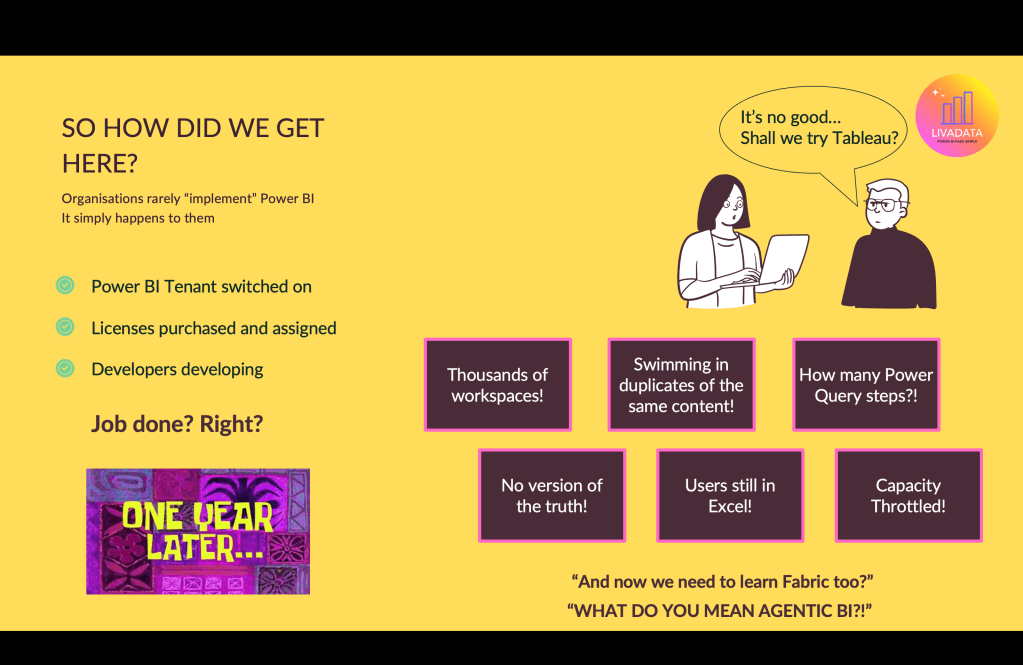
I open many of my Power BI Governance sessions with this to set the scene. Usually there are groans as people remember the estates that kept them up at night, or laughs from those who know better and dread the thought. I enjoy a bit of Power BI humour, but the reality is that with all the blogs, sessions, and consultants buzzing around the community, there are still organisations out there today that face this as a reality. Every one of those dramatised scenarios is genuinely a problem I’ve seen in live Power BI estates.
It’s no surprise that the default for some organisations in this scenario, on renewing their P SKU to an F SKU is “Turn Fabric items off… we don’t need to add any fuel to the fire!“. Fabric is seen as a new layer of ways things can go wrong. Show a BI team who are fighting fires in estates like this that AI innovation enables rapid development through Agentic BI, and you’ll likely be faced with exasperation or disillusion.
My answer to this? Estates that look like this may feel like a nightmare, but they are a gift. When you have a product that looks like this, you have a clear demand. People WANT to use the tool. The only thing worse than a platform with throttled capacity, thousands of workspace, and duplicated broken content… is a nice tidy platform that has no adoption.
When you start from this point, you design from the basis of what content matters most to people. Cultural and behavioural patterns can be spotted in workspace and content sprawl. There can be a nervousness to get started, as unpicking one can feel like kicking the first snowball down a mountain. My advice is to start by taking stock.
- Platform Monitoring
If you have no Observability, start there. The 30 days of activity you retrieve from the tenant by default is not enough to make informed decisions. Even if all you do is get your data out of the tenant through the REST API to start you off and make a habit of repeating this, but there are many great observability tools out there including FUAM, Measure Killer, PBI Sentinel and more. - Platform Audit
Get a hold of your tenant settings and workspace list. I have a list of which settings I deem critical, important or just quality of life, and how I prefer them to be by default (although of course this needs tailoring). If you’re stuck, running your extract doc through Copilot can yield pretty good results. An initial sweep of your workspaces will often surface some quick wins. The ones you can recommend are removed, and the rest you mark to review properly. - User Base Interviews
Check in on what’s working. What people’s biggest problems are. Forget the best practices and the blogs at this stage. This is about the humans. What makes your job harder than it needs to be? If you could wave a magic wand at Power BI what would it fix?
When you have these three elements somewhat covered, that’s where the fun really starts. I’ll be following up soon with the next part of the Building Your BI Team in a Fabric World session. For now, would love to hear about your Power BI beasts, the capacity monsters that keep you up at night, and what topics you hope this series covers.


 Livadata
Leave a comment