

As I’m currently sat in Oslo airport about to head back to London, it felt like the ideal time to sum up a fantastic day at Fabric February! In my first ever international conference, attending with my colleague David Mills representing team Dufrain, I came home with a notebook full of ideas and thoughts to share. I have so many topics I’d love to follow up on properly, but for now come with me on a tour through my brain as I digest all the great ideas and learnings from the day.
1. Power BI is the Microsoft bridge between tech and non tech.
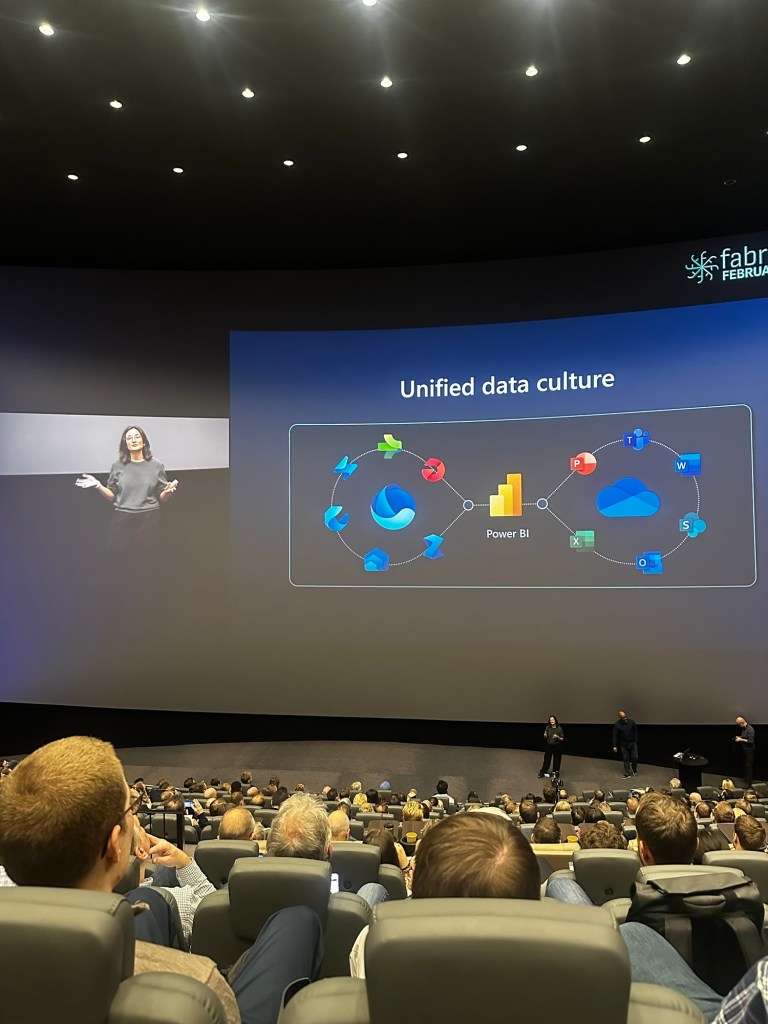
Kim Manis talked in her keynote about the unified data culture the Microsoft ecosystem supports. With Power BI straddling that old world and new world in a way, we should remember that for the everyday business user, Power BI is the bridge between the tech that they’re used to, and the tech they will use. For many, Power BI’s low code UI can be that first leap into data culture that we data people strive to create. As Fabric adoption rates rapidly increase across the world, those users will become ever more exposed to Fabric and Copilot – let’s hope we as data people are ready for them! We heard adoption stories from the city of Oslo, to brands we know and love like Chanel and Porsche. With Power BI now having more monthly users than the population of Australia, it’s never been a better time to be a Power BI champion. In a landscape where there is something new to learn almost every week, it’s good to remember that helping people adopt Power BI is a fundamental step in creating the data culture that drives true business value.
2. Copilot is about to change the game – again!
In some sneaky previews from Kim Manis and Patrick Le Blanc, I genuinely felt giddy with excitement at the new Copilot for Power BI UI that we will see roll out to Fabric soon. Users will soon be able to go straight to a Copilot tab from Power BI service, and directly ask for the insights they’re after. No more wading through catalogues of models and reports, no more “Can you send me that link again? Mine isn’t working anymore!”. Copilot will choose the appropriate semantic model to answer from, based only on those the users have access to and within the confines of any RLS. It’s more of the “Chat-GPT experience” that many are becoming quickly used to. You can take the generated report from Copilot straight to your workspace, and job done!
As much as some may be sceptic of the AI bubble (myself included to a wee extent), features like this always excite me for two reasons. Firstly, it’s the kind of thing users will dabble with, creating excitement and driving adoption. Secondly, it’s exactly the kind of feature execs and boards will sit up and hand over budget to invest in. For many board rooms, the ambition to invest in solid data foundations is old news. A snooze fest! (Perhaps because so many tried and failed due to lack of data strategy and tech over people approaches?) The topic more guaranteed than any to secure your data team investment right now is AI. So as we see Microsoft iterate on the capability of Copilot for Power BI, I can see this being a real game changer. That being said…
3. Poorly managed Power BI environments will kill off your AI adoption
I know, I know, if you’re here reading this blog, I’m sure I’m preaching to the choir! I simply cannot say it enough that to be truly ready to drive the adoption rates we want to see in Fabric and Copilot, it’s time to get a grip for once and for all of those beastly unmanaged Power BI Platforms. Organisation’s who have allowed Power BI to grow organically now find themselves swimming in workspaces nobody owns, redundant reports, unperformant models and security that would keep me up at night. Busy environments like this are victims of their own success in a way – people used the tool. Isn’t that what we all want? Better to regain control of a messy platform I say than to sit back smiling at your tidy controlled environment that nobody is free to use.
Consider your last UAT. You rolled out your latest model and report into a test workplace, set up the access for your UAT group and some weeks later, sign off in hand (hopefully!) you push your work to production and call it a day. Did you remember to go back and remove the access for the UAT users to the test asset or workspace? Did you even bother to turn off the refresh? Or worse, did you never set up a refresh and now users have two models to look at – one of which never updates? While we can trust users (again – hopefully!) to note the name of a workspace when viewing a report, to enable Copilot to give our users the most seamless experience possible, let’s get back and sweep up those legacy workspaces and test environments. Workspace and access management strategies, platform monitoring and audits, and change control are key elements to covering the brilliant basics that will support users the experience we all want.
4. Write back functionality to Fabric is going to completely overhaul the way we work with Power BI
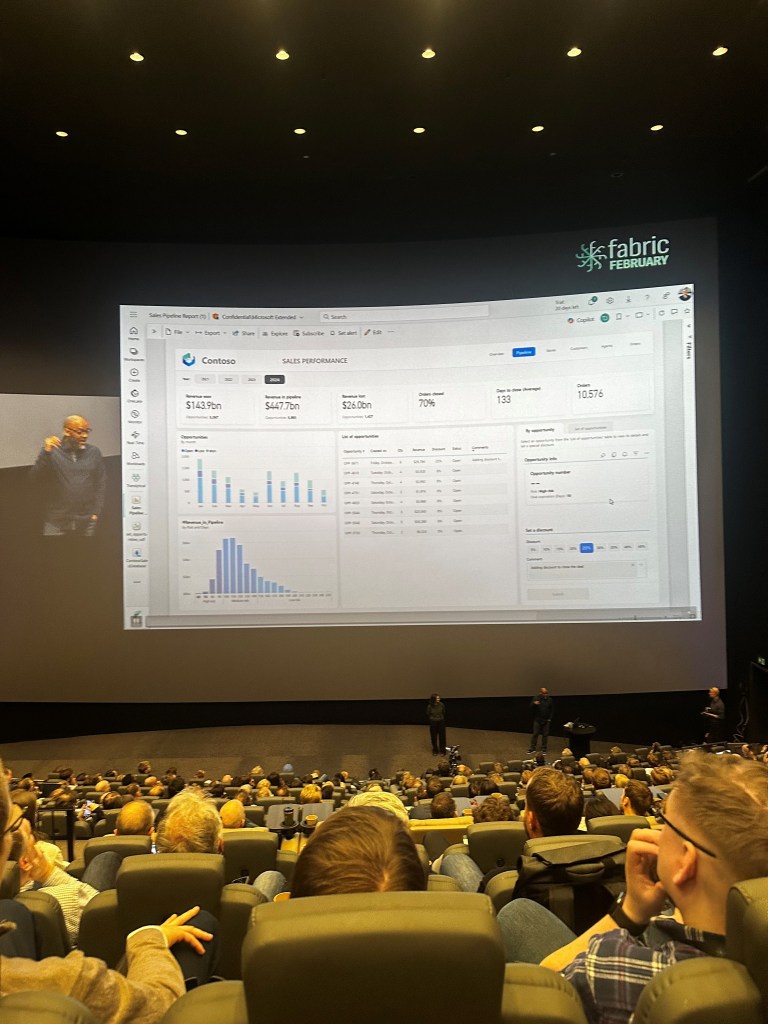
A long awaited feature that will see Power BI Developers cheer while DBAs and Architects groan, I got a proper look for the first time today at what Power BI write back functionality to Fabric will look like. Simply code your write back functions, and then tie those functions to a button in Power BI the way we are familiar with for bookmarks and other such navigation features. During the keynote, Patrick Le Blanc demonstrated a use case where users could view insights about opportunities, select opportunities and apply discounts or change a status. By submitting this change, Fabric updates Power BI in real time to show us the new insights. With the right implementations, I can see this being a complete reset on the way we design Power BI. Imagine a world where our finance teams can approve deals straight from Power BI – without ever needing to open Excel! A common scenario that makes data teams itch is where business users create composite Power BI models to augment self-service models with custom groupings and categories for our dimensions. Imagine instead of merged Excel files, Fabric functions allow business users to tag and group information as they see fit. Writing back to the central platform, our data teams once again hold the key to the one version of the truth we all strive for.
5. Pausing your Fabric capacity might cost you money rather than save you money
As many assess the costs and weigh up PAYG v Reserved pricing, it would be fair to assume that one can pause their capacities as they wish to minimise costs. Understanding smoothing in Fabric is key to understanding how to manage your Fabric capacities. In a great session by Benni De Jagere on how to manage Fabric Capacities, the importance of understanding smoothing and throttling was stressed.
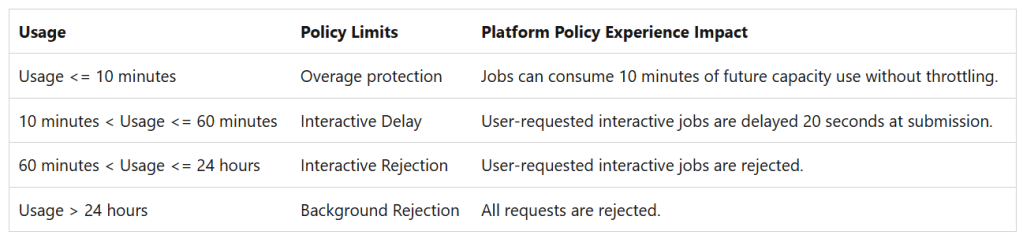
To provide your data teams and users with a seamless Fabric experience, it’s critical to understand the behaviour of the smoothing process. This process encourages innovation by allowing you to “overspend” from the CUs you have purchased, before the overage is clawed back from your available CUs over a 24 hour window. This essentially eliminates the scheduling chaos that can be created by having to force all your background operations to finish in the dead of night if that doesn’t actually suit your business. It’s also key to understand the hierarchy of where those CUs are clawed back from:
You can read more on this here, and I think this is a topic I’ll be circling back to with more thoughts from my experiences.
6. No version control tech can beat people first processes.
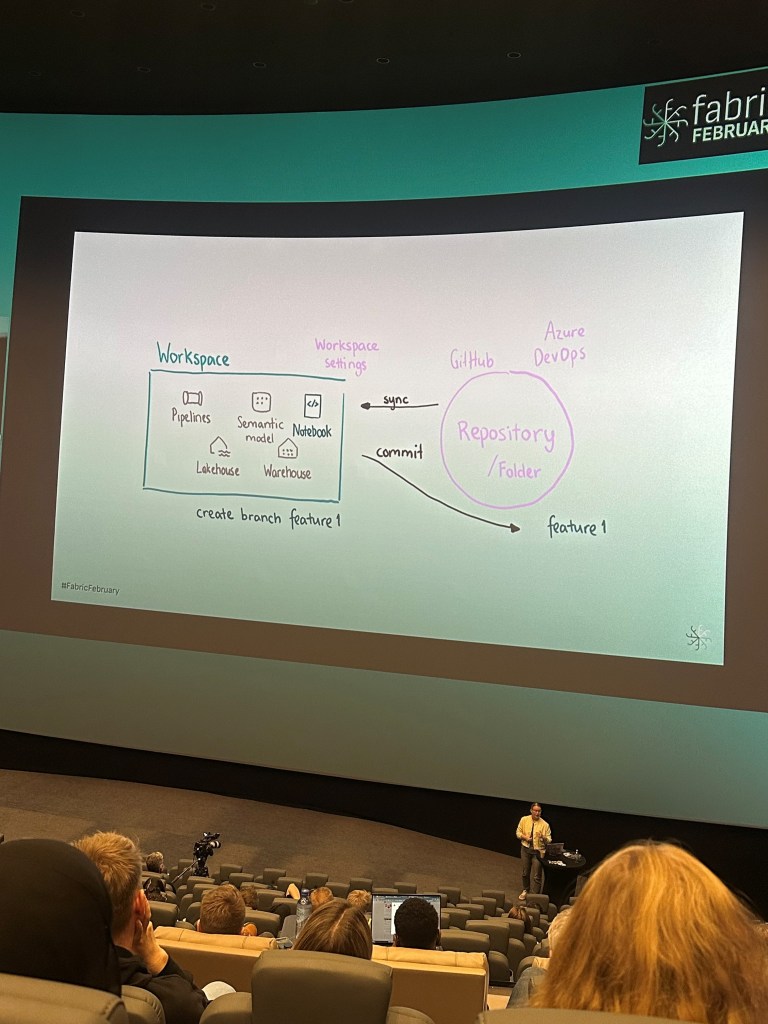
Heini Ilmarinen presented a great session on Version Control in Fabric, and I found myself scribbling down a key quote as the topic of Fabric APIs and custom scripts to control Git integration was covered – “it sounds hacky because it is.” I’d say this sums up my sentiment toward controlling versioning in a platform which is still so new to many. Heini went on to stress the importance of keeping it simple, and considering the value of any complex or elaborate custom versioning solution before investing too much effort. Consider the cost of doing it against the cost of not doing it. If you’re a really techy team, and get a kick out of pushing the art of the possible and automating against every possible human error, then sure why not go for it! However, for the average Power BI team – Heini’s advice to keep it simple would be very much echoed by me.
I urge organisations I work with to take time considering who are the people in your data team? What role do they carry out? Do you have gaps in your target role profiles that people are having to cover? Are there silos in your teams that could be better bridged with collaborative working and better comms? Do your processes have over-governed approval processes that block innovation and cause your developers to find back doors to get critical work over the line, where again – improved collaboration and comms could allow early intervention from approvers.
Considering these factors holistically is key to striking the right balance between controls and innovation (this is a key theme in anything I do). Focus more on clearly defined roles and fostering collaboration to create an environment where version control solutions support rather than hinder innovation.
7. How do we support data teams being seen as a value centre not a cost centre? Chargeback reporting?
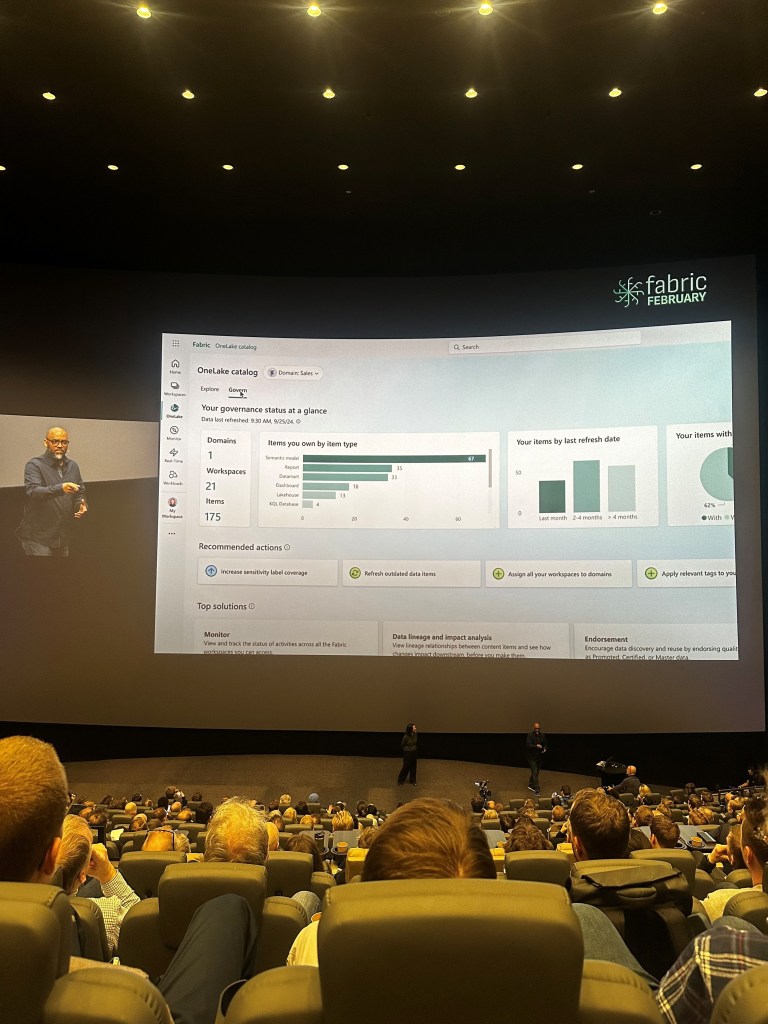
Coming back to that keynote featuring Patrick Le Blanc, we got a sneak preview of enhanced monitoring reporting coming soon to Fabric. The new Chargeback view will drastically improve visibility of which areas of the business are using the most capacity.
We often talk about the perception of data teams as a cost centre when (if used properly!) can be one of the most value adding teams in an organisation. By being able to attribute Fabric costs to other areas of the business, organisations could split data costs fairly amongst functions or business units. This could also support backlog refinement and support with justification for further investment – teams with lowest capacity usage arguably would need further investment to drive adoption in those areas. Or you could flip this and argue that teams with the highest consumption perhaps have more technical debt and need investment to optimise the performance of their assets? Regardless, conversations around funding and investment are set to be much more accessible with the progress I’ve seen a small taste of at Fabric February.
By making data usage visible and accountable across an organisation, chargeback reporting could be a key driver in transforming the perception of data teams into strategic enablers rather than just an operational expense.
8. Let’s get real(time)
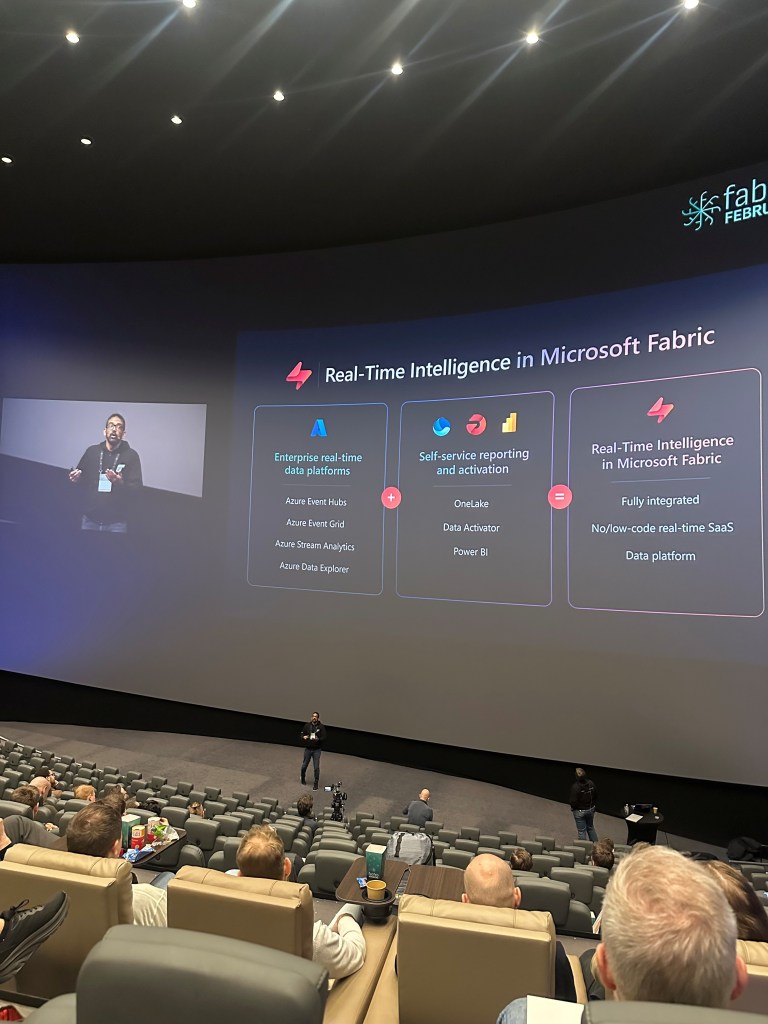
Real-time reporting was the hot topic of the day, with plenty of sessions available covering this feature. I attended the morning session aimed at Power BI Pros by Devang Shah and Gabi Münster. They discussed “how real-time is real-time?” – for some scenarios this could mean milliseconds, where other scenarios would look at hourly data as being real-time “enough”. Consider how fresh the data you’re working with is and shape your solution around that.
They also demonstrated a cool use case where the real-time hub can be used by Fabric admins to move from reactive to proactive management, automating notifications for failed updates or deleted items. Anything to be one step ahead of an influx of service desk tickets!
They also polled the room, asking how many people avoided using DirectQuery – the results were a good chunk of the room raising their hands! Devang advised if you haven’t tried DirectQuery over Kusto, then not to rule it out as it can be very performant.
There is a real buzz for realtime solutions at the moment – with the improved functionality Fabric puts directly in the hands of Power BI pros, it’s time to dust off those old DirectQuery models and let’s see what we can do!
9. If you’re using DirectLake, you have to be using Semantic Link Labs.
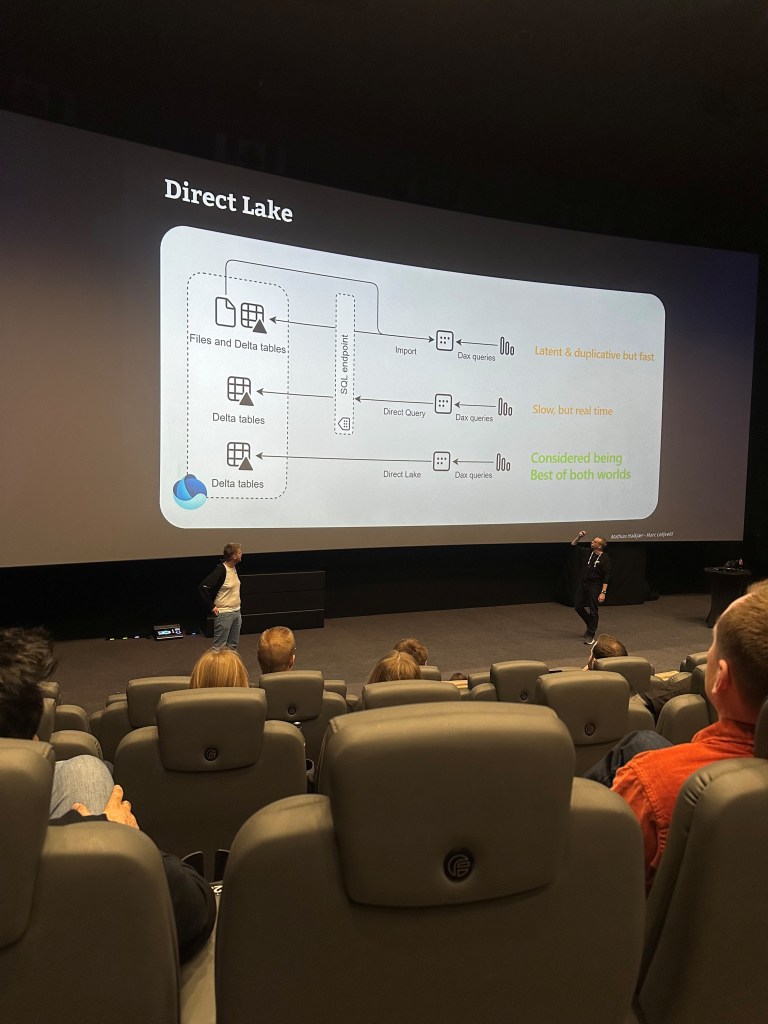
For many who have been tinkering with DirectLake models in their early Fabric proof of concepts, DirectLake may have – dare I say – disappointed for some. That first load, expecting lightning fast loads and seeing the buffer wheel we all dread is a familiar experience, but there is plenty of content out there to help you navigate this. DirectLake will fall back to DirectQuery if used incorrectly. I attended a great session on this from Chris Webb back at SQLBits 2024, which you can watch here. The key is to not assume this new supercharged storage mode means there’s no need to build an optimised model. We still want that slick star schema. There is also a model setting that allows you to disable DirectQuery fallback using tools like Tabular Editor or any other TMDL viewer.
At Fabric February, I checked out a great session from Marc Lelijveld and Mathias Halkjaer’s on this to hear about their experience optimising with Semantic Link Labs. Personally, I much prefer the idea of navigating this optimisation from the comfort of a Fabric Notebook than having to jump to third party tooling. Their point around the lack of Power Query in Direct Lake models being a good thing was one I would absolutely echo. If you have gone to the effort of developing a brand new Fabric solution that supports a DirectLake model, let’s not fill it with tactical transformations. Move that stuff up to your notebooks, or if you insist, a Dataflow Gen2 (which has all the functionality of PowerQuery if you’re not ready to give up your M code yet!). While this may feel a bit inconvenient for Power BI Developers looking to tactically transform their data while modelling, I instead view it as a great way to force us to get comfortable with moving upstream into the Fabric world.
There’s a great blog from Kurt over at Data Goblin’s on Semantic Link labs in Fabric Notebooks you can read up on here also.
10. The death of P SKUs is needed in a Fabric world to allow simplification and flexibility.
Announced in March 2024, the retiring of Power BI Premium Capacity SKUs means we will see the last P SKUs disappear throughout 2025 as customers complete their renewal cycles. While there may be some scepticism of this Fabric push, I would argue it is unfounded. With reservation pricing providing as much as a 41% saving, Power BI Premium customers won’t feel the shift all that much. You’ll need an F64 to give you the free viewer licenses you’re used to with Premium SKUs, and with this you unlock the possibilities of Copilot.
There is so much to gain from Power BI teams migrating those legacy Power Query transforms or native scripts upstream to Fabric notebooks as they embrace the functionality that comes with their new SKUs. I have lots to say about how organisations need to support their BI teams in a Fabric world – you’ll find me at the Manchester User Group on Thursday 27th March delivering my new session on this.
And a final point…
What a joy to attend a tech event organised by three women! Catherine, Marthe and Emilie pulled off a blinder and I was so glad to get a chance to say hello and thank them for organising such a smooth day. You could really feel the female touch on things, from the fun tone of voice of the day, to the baskets of ladies accessories in the bathrooms, and not to mention the best food I’ve had at an event. #SNÆCKS anyone?




 Livadata
Leave a comment